|
Shipping & Delivery |
|

Please note that your account configuration may not allow all the features described in the Help Centre.

We offer free delivery across the country subject to minimum order requirements. Within our large, local delivery areas.
- It is our mission to deliver a streamlined experience along with your items! Here’s what to expect during shipping and delivery.
Some items that are bulky or heavy may require special handling delivery. In some remote areas, a product handling fee could be added to reflect the higher delivery costs.
There are some items that will be restricted in some very remote areas because of the prohibitive delivery costs.
To see if a product has a handling charge, this icon  might appear to the right of the price in the quick view and on the Product Details page. At checkout, your order summary may also show a handling charge amount.
To reduce the environmental impact and order delivery costs, we encourage our customers in remote locations to place their orders less often but with a larger volume. For each region, Staples sets a minimum order amount to be exempt from delivery charges. If this minimum is not reached, a delivery zone fee may be added.
Environmental fees imposed by certain Canadian Provinces may have been added to your order's total. These fees will be billed on your invoice only if you ordered items that are subject to this fee used to maintain the recycling programs. Note that these fees are not delivery related.
Fifty Green fees may be added to your order if it's below the $50 minimum level.
To prevent this charge from being added, you may continue shopping to bring your order total over $50 before taxes. The Fifty Green screen recommends popular items you can conveniently add to your order.
If you wish to proceed with your order, you'll be pleased to know that a portion of each fee collected helps to buy a tree as part of the Tree Canada donation program.
Note that these fees are not delivery related.
We provide the possibility to have your shipments delivered to each employe and to get a mandatory signature. For more information you can contact one of our experts in Customer Care.
Orders placed and approved by 4:00 PM (local time of your Province) Monday through Friday (excluding holidays) are processed the same day. We ask that you process your order as early in the day as possible to facilitate next business-day delivery of in-stock products.
If items are in stock, we will attempt to deliver your order on the next business day.
If the item is only available from a trusted partner or wholesaler, it will take longer to ship depending on availability and distance for delivery.
Other exceptions to next day delivery include (but are not limited to): items on back order, special-order items (including custom items), mishaps in delivery (missing items, damaged items, mis-delivered, etc.), weekend deliveries and Special furniture deliveries.
If the item is only available from a trusted partner  , it will take longer to ship depending on availability and distance for delivery.
-
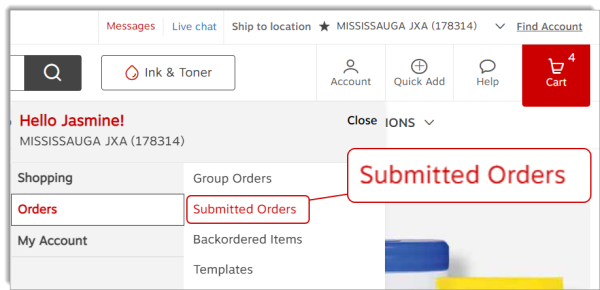
From the Account menu, hover the Orders tab and select option Submitted Orders.
-
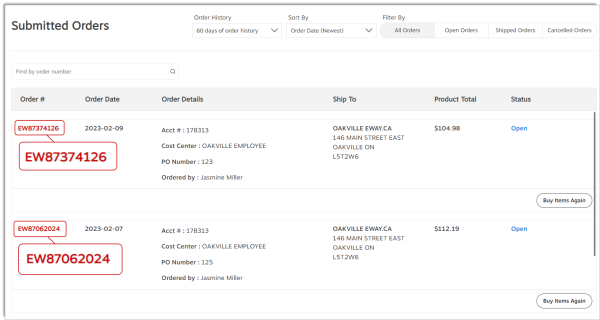
Click on the Order number you wish to track.
-
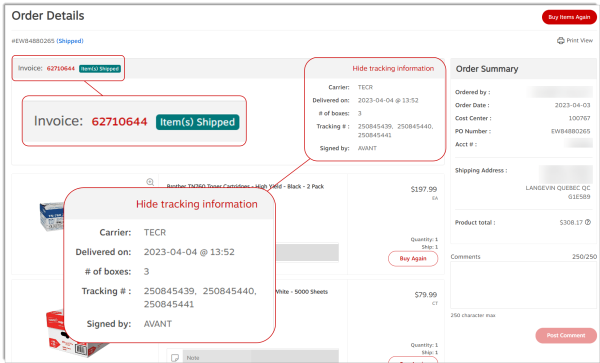
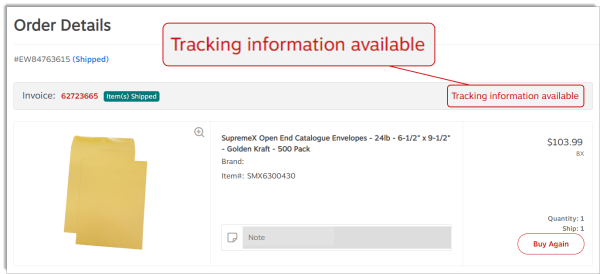
In the product list header, click on the Tracking information available link. You'll find the carrier's name, the number of parcels as well as the delivery date and receiver's name if the order was already delivered.
- The message "In Transit" means that the parcels have left our warehouse and will be delivered shortly. Come back to this order later to view the proof of delivery.
- The message "Status unavailable online" means that the information you are looking for cannot be viewed in this page. Contact a Customer Care representative for more details.
- You may click on a tracking number to open the carrier's tracking site for more details.
- Check your order and shipment confirmation emails to determine if your missing item is scheduled to ship separately.
- If your missing item was scheduled to arrive with other items that you have already received, please contact our Customer Care.
If you don't receive your order by 5 pm on the scheduled delivery date, please track your order on the Submitted Orders page to see if there have been any updates on the expected delivery date. If there have been no changes, please contact our Customer Care Service.
We apologize for the inconvenience. Follow the steps below to return your damaged or defective item and receive a refund. You will then need to place a new order for the item.
If you are not able to place a new order and need a replacement right away, please contact our Customer Care Service.
-
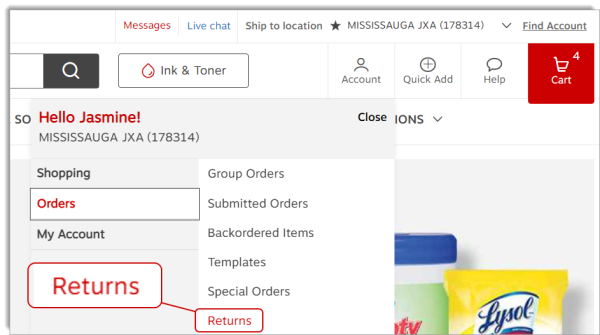
Click on the Account menu, hover the Orders tab and select option Returns.
-
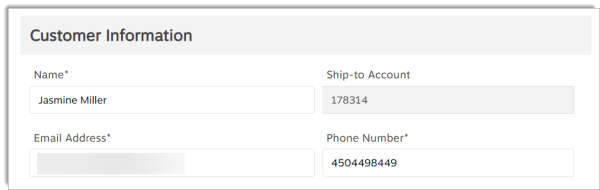
You can modify the content of the Customer Information section if required.
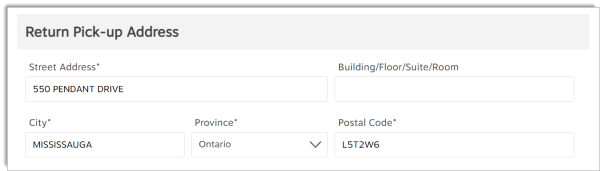
- In the Return Pick-up Address section, your default address is automatically selected.
If the item must be picked up at a different address, enter it here.
-
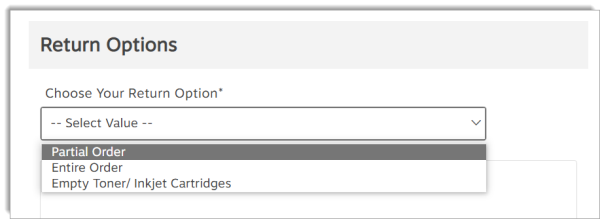
In the Return Options section, select Partial Order or Entire Order.
- Partial Order
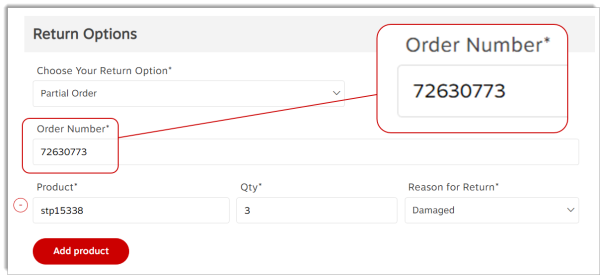
- Enter the product code of the damaged or defective item.
- Enter the quantity to return.
- Select Return Option: Damaged or Manufacturer's Defect.
- Entire order
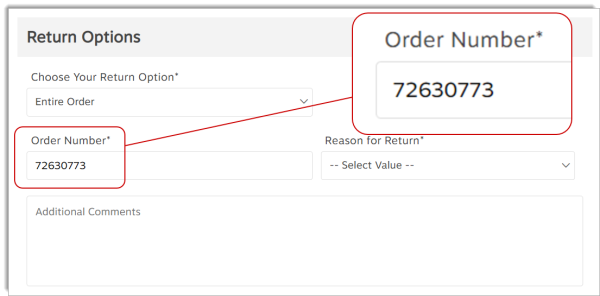
- Enter the Order number.
- Select Return Option: Damaged or Manufacturer's Defect.
- Partial Order
- Enter Comments related to the return in the appropriate box.
- Check box to confirm that you read our return policy.
- Click on Submit Request for Return.
-
Click on the Account menu, then hover the Orders tab and select option Backordered Items.
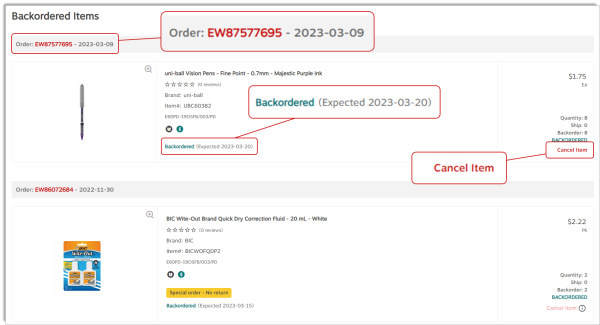
- The item's expected delivery date is shown below the product's description.
- An substitute product code may also display.
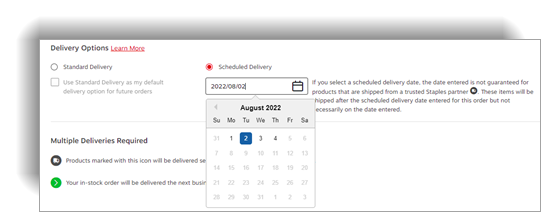
During the check out process, you could have the possibility to select a specific delivery date for your order.
-
Staples Professional provides the ability for customer to specify future delivery dates up to 6 months. Please note that Staples Professional does not deliver on weekends or statutory holidays.
-
Special Delivery Products: Please note that Standard Delivery, Scheduled Delivery and Sameday / Rush Delivery options are not applicable to Special Delivery Products. Special Delivery Products are highlighted on Eway with the following icon
 : Delivery charges may apply.
 -
Products that ship separately: Please note that Standard Delivery, Scheduled Delivery and Sameday / Rush Delivery options are not applicable to Products that ship separately. Products that ship separately are highlighted on Eway with the following icon
 : Products that ship separately.
-
Click on the Account menu, hover the Orders tab and select option Submitted Orders.
-
From the Order History drop-down list, select the appropriate period for the invoice you are looking for.
-
Click on the red eway order number.
-
click on the Tracking Information Available link.
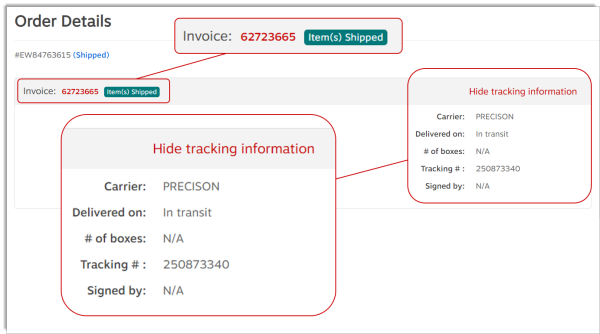
- The order's status must be set to Shipped to have a proof of delivery available.
If Special Delivery items are part of your order, the assembly option is offered to you.
During the checkout process, you will reach the Delivery Details page, where you will be invited to choose a service option:
-
If you select Delivery, you can choose to have these items installed. This means unwrapping, assembling and positioning the items in the desired location.
-
If you select Pick-up or Delivery without Installation, you can still take advantage of our pre-assembly service on eligible products. For a small fee, this service could save you a lot of valuable time.
-
These added fees will be clearly identified in your cart when you checkout by this Assembly Fee
 icon.
icon.
During the checkout process, the Delivery Details screens appears for every order, but its content may vary depending on the items in your cart.
- If there's a Special Delivery item in your cart, you'll have to select your Special Delivery options.
- Your account's Delivery Address appears by default. Make changes as needed.
- You can try choosing an alternate preset shipping address by returning to the shopping cart and selecting a new Ship-To account.
- Check the appropriate delivery option.
- Standard Delivery - delivered the next business day in major markets within Canada.
- Scheduled Delivery - delivered at a future date of your choosing. Select the required date in the calendar.
- Same Day Delivery - for eligible items. Additional charges may apply.
- A section named Delivery Date or Multiple Deliveries Required or Pickup Information contains a message about the delivery or pick-up process, depending on the products in the order and the selected special delivery options.
If Special Delivery items are part of your order, the installation option is offered to you.
During the checkout process, you will reach the Delivery Details page, where you will be invited to choose a service option:
-
If you select Delivery, you can choose to have these items installed. This means unwrapping, assembling and positioning the items in the desired location.

Last Update : January 25, 2024
© Staples Canada ULC | All rights reserved.